Upryzing Frontend
Welcome to the developer documentation for the Lavender project and general guidelines for other platforms we build for.
This is very much incomplete and needs more work!
Documentation Contribution Guidelines
This list is also very much incomplete, but it’ll grow as time goes on:
- Convert all assets to WebP when contributing new images.
Contribution Guide
If you have not yet read it, read the main contribution guide.
You can get started with Lavender by following the development guide on the repository.
Contribution Policy
Since this project is still heavily in development, things may change rapidly at little notice, so it’s recommended that you join the Upryzing server and the Upryzing development server where you can talk in #Lavender about this project.
If something is explicitly marked as ‘help wanted’, then you can likely just pick up the issue and contribute a PR, however, you should make sure to communicate this on the issue so others don’t start on the same issue as you, causing issues later.
Otherwise, feel free to come ask about what you’d like to contribute and run it past a maintainer so that we can check if there are any potential conflicts.
Feature Matrix
Comparison of implemented features across Revolt’s clients.
| Category | Subcategory | Feature | Revite | Frontend | Android | iOS | Priority | |
|---|---|---|---|---|---|---|---|---|
| Authorisation | Login | Log into an account | ✅ | ✅ | ✅ | ✅ | P0 Must | |
| Create an account | ✅ | ✅ | ✅ | ✅ | P0 Must | |||
| Send password reset | ✅ | ✅ | ❌ | ✅ | P0 Must | |||
| Resend email verification | ✅ | ✅ | ❌ | ✅ | P0 Must | |||
| Confirm password reset | ✅ | ✅ | ❌ | ❌ | Unapplicable | |||
| Confirm email verification | ✅ | ✅ | ⛔ | ❌ | Unapplicable | |||
| Confirm account deletion | ✅ | ✅ | ⛔ | ❌ | Unapplicable | |||
| Multi-Factor Authentication | Use Password | ✅ | ✅ | ✅ | ✅ | P0 Must | ||
| Use TOTP | ✅ | ✅ | ✅ | ✅ | P0 Must | |||
| Use Recovery | ✅ | ✅ | ✅ | ✅ | P0 Must | |||
| Session Lifecycle | Spec Compliant | ⛔ | ✅ | ✅ | ❌ | P0 Must | ||
| Home | General | Home | Launch Page | ✅ | ✅ | ✅ | ✅ | P0 Must |
| Saved Notes | ✅ | ✅ | ✅ | ✅ | P0 Must | |||
| Friends | List Friends & Blocked | ✅ | ✅ | ✅ | ✅ | P0 Must | ||
| List Pending Requests | ✅ | ✅ | ✅ | ✅ | P0 Must | |||
| Accept Requests | ✅ | ✅ | ✅ | ✅ | P0 Must | |||
| Send Requests | ✅ | ✅ | ✅ | ✅ | P0 Must | |||
| Remove / Block Users | ✅ | ✅ | ✅ | ✅ | P0 Must | |||
| Unblock Users | ✅ | ✅ | ✅ | ✅ | P0 Must | |||
| Quick Actions for Users | ✅ | ✅ | ✅ | ✅ | P0 Must | |||
| User Profile | Show Profile | ✅ | ✅ | ✅ | ✅ | P0 Must | ||
| Mutual Friends | ✅ | ✅ | ❌ | ❌ | P1 Preferred | |||
| Mutual Groups | ✅ | ✅ | ❌ | ❌ | P1 Preferred | |||
| Mutual Servers | ✅ | ✅ | ❌ | ❌ | P1 Preferred | |||
| Groups | List Conversations | ✅ | ✅ | ✅ | ✅ | P0 Must | ||
| Create Group | ✅ | ✅ | ✅ | ✅ | P0 Must | |||
| Show Group Members | ✅ | ✅ | ✅ | ✅ | P0 Must | |||
| Edit Settings | ✅ | ✅ | ✅ | ❌ | P0 Must | |||
| Servers | Server List | User Home | ✅ | ✅ | ✅ | ✅ | P0 Must | |
| Unread Conversations | ✅ | ✅ | ✅ | ✅ | P0 Must | |||
| List Servers | ✅ | ✅ | ✅ | ✅ | P0 Must | |||
| Reorder Servers | ✅ | ✅ | ❌ | ❌ | P1 Preferred | |||
| Create Server | ✅ | ✅ | ✅ | ❌ | P0 Must | |||
| Join Server | ✅ | ✅ | ✅ | ✅ | P0 Must | |||
| Revolt Discover | ✅ | ✅ | ✅ | ✅ | P0 Must | |||
| Roles | Coloured Usernames | ✅ | ✅ | ✅ | ✅ | P0 Must | ||
| Users | Change Server Avatar | ✅ | ✅ | ❌ | ❌ | P1 Preferred | ||
| Change Nickname | ✅ | ✅ | ❌ | ❌ | P1 Preferred | |||
| Settings | Basic Information | Update Information | ✅ | ✅ | ❌ | ❌ | P1 Preferred | |
| Update Icon | ✅ | ✅ | ❌ | ❌ | P1 Preferred | |||
| Update Banner | ✅ | ✅ | ❌ | ❌ | P1 Preferred | |||
| Update System Message Targets | ✅ | ✅ | ❌ | ❌ | P1 Preferred | |||
| Update Categories | ✅ | ✅ | ❌ | ❌ | P1 Preferred | |||
| Re-order Channels and Categories | ✅ | ✅ | ❌ | ❌ | P1 Preferred | |||
| Roles | Create Role | ✅ | ✅ | ❌ | ❌ | P1 Preferred | ||
| List Roles | ✅ | ✅ | ❌ | ❌ | P1 Preferred | |||
| Delete Role | ✅ | ✅ | ❌ | ❌ | P1 Preferred | |||
| Update Role Information | ✅ | ✅ | ❌ | ❌ | P1 Preferred | |||
| Update Permissions | ✅ | ✅ | ❌ | ❌ | P1 Preferred | |||
| Customisation | Create Emoji | ✅ | ✅ | ❌ | ❌ | P2 Best Effort | ||
| List Emoji | ✅ | ✅ | ❌ | ❌ | P2 Best Effort | |||
| Delete Emoji | ✅ | ✅ | ❌ | ❌ | P2 Best Effort | |||
| Users | List Members | ✅ | 🚧 | ❌ | ❌ | P2 Best Effort | ||
| Set Roles | ✅ | ✅ | ❌ | ❌ | P2 Best Effort | |||
| Create Invite | ✅ | ✅ | ✅ | ✅ | P0 Must | |||
| List Invite | ✅ | ✅ | ❌ | ❌ | P2 Best Effort | |||
| Delete Invite | ✅ | ✅ | ❌ | ❌ | P2 Best Effort | |||
| Bans | List Bans | ✅ | ✅ | ❌ | ❌ | P1 Preferred | ||
| Pardon User | ✅ | ✅ | ❌ | ❌ | P1 Preferred | |||
| Delete Server | ✅ | ✅ | ❌ | ❌ | P1 Preferred | |||
| Channels | Interface | Channel Information | View Channel Description | ✅ | ✅ | ✅ | ✅ | P1 Preferred |
| Age Gate | ✅ | ✅ | ✅ | ✅ | P0 Must | |||
| Server | Left Sidebar | Server Information | ✅ | ✅ | ✅ | ✅ | P0 Must | |
| View Server Description | ✅ | ✅ | ✅ | ✅ | P1 Preferred | |||
| List Channels | ✅ | ✅ | ✅ | ✅ | P0 Must | |||
| Channel Categories | ✅ | ✅ | ✅ | ✅ | P0 Must | |||
| Channel Icons | ✅ | ✅ | ✅ | ✅ | P1 Preferred | |||
| Member List | View Members | ✅ | ✅ | ✅ | ✅ | P0 Must | ||
| Hoisted Roles | ✅ | ✅ | ✅ | ✅ | P0 Must | |||
| Messaging (Text Channel) | Read Messages | Load Recent Messages | ✅ | ✅ | ✅ | ✅ | P0 Must | |
| Inline Badges | 🚧 | ✅ | ✅ | 🚧 | P1 Preferred | |||
| Inline Pronouns | ⛔ | ❌ | ❌ | ❌ | Unapplicable | |||
| Masquerade | ✅ | ✅ | ✅ | ✅ | P1 Preferred | |||
| Show Mentions | ✅ | ✅ | ✅ | ✅ | P0 Must | |||
| Show @ Role/Everyone/Online | ❌ | ✅ | ❌ | ❌ | PX New Feature | |||
| Show Channel Links | ✅ | ✅ | ✅ | ✅ | P0 Must | |||
| Show Server Links | ⛔ | ✅ | ❌ | ❌ | P3 Unimportant | |||
| Show Message Links | ⛔ | ✅ | ❌ | ❌ | P3 Unimportant | |||
| Show Replies | ✅ | ✅ | ✅ | ✅ | P0 Must | |||
| Show Reactions | ✅ | ✅ | ✅ | ✅ | P0 Must | |||
| Attachments | ✅ | ✅ | ✅ | ✅ | P0 Must | |||
| Embeds | ✅ | ✅ | ✅ | ✅ | P0 Must | |||
| System | ✅ | ✅ | ✅ | 🚧 | P1 Preferred | |||
| Invites | ✅ | ✅ | ❌ | ❌ | P1 Preferred | |||
| Quick Actions | Reply | ✅ | ✅ | ✅ | ✅ | P0 Must | ||
| React | ✅ | ✅ | ✅ | ✅ | P1 Preferred | |||
| Copy Text | ✅ | ✅ | ✅ | ✅ | P0 Must | |||
| Copy Link | ✅ | ✅ | ✅ | ✅ | P0 Must | |||
| Copy ID | ✅ | ✅ | ✅ | ✅ | P0 Must | |||
| Mark as unread | ✅ | ✅ | ✅ | ❌ | P1 Preferred | |||
| Quote | ✅ | ⛔ | ⛔ | ⛔ | P3 Unimportant | |||
| Edit | ✅ | ✅ | ✅ | ✅ | P0 Must | |||
| Delete | ✅ | ✅ | ✅ | ✅ | P0 Must | |||
| Pin | ⛔ | ✅ | ❌ | ❌ | PX New Feature | |||
| Read Chat History | Load Older Messages | ✅ | ✅ | ✅ | ✅ | P0 Must | ||
| Jump to End | ✅ | ✅ | ✅ | ❌ | P1 Preferred | |||
| Jump to Message | ✅ | ✅ | ❌ | ✅ | P2 Best Effort | |||
| Search Messages | ✅ | ✅ | ❌ | ❌ | P2 Best Effort | |||
| View Pinned Messages | ⛔ | ✅ | ❌ | ❌ | PX New Feature | |||
| Message Composition | Send Messages | ✅ | ✅ | ✅ | ✅ | P0 Must | ||
| Reply to Messages | ✅ | ✅ | ✅ | ✅ | P0 Must | |||
| Pick Emoji | ✅ | ✅ | ✅ | ✅ | P2 Best Effort | |||
| Pick GIF | ❌ | 🚧 | ❌ | ❌ | P3 Unimportant | |||
| Autocomplete Channel | ✅ | ✅ | ✅ | ✅ | P1 Preferred | |||
| Autocomplete User | ✅ | ✅ | ✅ | ✅ | P1 Preferred | |||
| Autocomplete Emoji | ✅ | ✅ | ✅ | ✅ | P1 Preferred | |||
| Send Files | ✅ | ✅ | ✅ | ✅ | P0 Must | |||
| Preview files to send | ✅ | ✅ | ❌ | ✅ | P1 Preferred | |||
| Show messages being sent | ✅ | ✅ | ❌ | ❌ | P1 Preferred | |||
| Retry sending failed messages | ✅ | ✅ | ❌ | ❌ | P2 Best Effort | |||
| Show attachments being sent | ✅ | ✅ | ❌ | ❌ | P2 Best Effort | |||
| Cancel message being sent | ⛔ | ❌ | ❌ | ❌ | P3 Unimportant | |||
| Talking (Voice Channels) | Base Voice | Voice Chats v2 (LiveKit) | ⛔ | 🚧 | ❌ | ❌ | PX New Feature | |
| Screen sharing | ⛔ | 🚧 | ❌ | ❌ | PX New Feature | |||
| Video (webcam) sharing | ⛔ | 🚧 | ❌ | ❌ | PX New Feature | |||
| UX features | Volume control | ⛔ | ❌ | ❌ | ❌ | PX New Feature | ||
| Ignore blocked users | ⛔ | ❌ | ❌ | ❌ | PX New Feature | |||
| Hide non-video participants | ⛔ | ❌ | ❌ | ❌ | PX New Feature | |||
| Moderation | Disconnect members | ⛔ | ❌ | ❌ | ❌ | PX New Feature | ||
| Server mute members | ⛔ | ❌ | ❌ | ❌ | PX New Feature | |||
| Settings | Basic Information | Update Information | ✅ | ✅ | ❌ | ❌ | P2 Best Effort | |
| Set Icon | ✅ | ✅ | ❌ | ❌ | P2 Best Effort | |||
| Edit Role Permissions | ✅ | ✅ | ❌ | ❌ | P2 Best Effort | |||
| Edit Group Permissions | ✅ | ✅ | ❌ | ❌ | P2 Best Effort | |||
| Webhooks | List Webhooks | ⛔ | ✅ | ❌ | ❌ | PX New Feature | ||
| Create Webhook | ⛔ | ✅ | ❌ | ❌ | PX New Feature | |||
| Update Webhook Information | ⛔ | ✅ | ❌ | ❌ | PX New Feature | |||
| Delete Webhook | ⛔ | ✅ | ❌ | ❌ | PX New Feature | |||
| Copy Webhook URLs | ⛔ | ✅ | ❌ | ❌ | PX New Feature | |||
| Notifications | Filter all, mention notifications | ✅ | ✅ | ❌ | ❌ | P0 Must | ||
| Mute channels indefinite or period | 🚧 | ✅ | ❌ | ❌ | ||||
| Markdown | RSM | Basic Styles | ✅ | ✅ | ✅ | ✅ | P0 Must | |
| Code Blocks | ✅ | ✅ | ✅ | ❌ | P1 Preferred | |||
| Code Formatting | ✅ | ✅ | ✅ | ❌ | P1 Preferred | |||
| Block Quotes | ✅ | ✅ | ❌ | ❌ | P1 Preferred | |||
| Spoilers | ✅ | ✅ | ❌ | ❌ | P1 Preferred | |||
| Links | ✅ | ✅ | ✅ | ✅ | P1 Preferred | |||
| Headings | ✅ | ✅ | ❌ | ❌ | P2 Best Effort | |||
| Tables | ✅ | ✅ | ❌ | ❌ | P2 Best Effort | |||
| Lists | ✅ | ✅ | ❌ | ❌ | P2 Best Effort | |||
| Text Formatting Extensions | ❌ | 🚧 | ❌ | ❌ | P2 Best Effort | |||
| Inline Math (KaTeX) | ✅ | ✅ | ⛔ | ⛔ | Unapplicable | |||
| Block Math (KaTeX) | ✅ | ✅ | ❌ | ❌ | P2 Best Effort | |||
| Timestamps | ✅ | ✅ | ✅ | ❌ | P2 Best Effort | |||
| Unicode Emoji | ❌ | ✅ | ✅ | ✅ | P1 Preferred | |||
| Custom Emoji | ✅ | ✅ | ✅ | 🚧 | P1 Preferred | |||
| User Safety | Reporting | Report Message | ✅ | ✅ | ✅ | ✅ | P0 Must | |
| Report Server | ✅ | ✅ | ✅ | ❌ | P0 Must | |||
| Report User | ✅ | ✅ | ✅ | ❌ | P0 Must | |||
| Settings | User | Account | Update Username | ✅ | ✅ | ❌ | ✅ | P1 Preferred |
| Update Email | ✅ | ✅ | ❌ | ✅ | P1 Preferred | |||
| Update Password | ✅ | ✅ | ❌ | ✅ | P1 Preferred | |||
| Configure MFA Recovery | ✅ | ✅ | ❌ | ✅ | P2 Best Effort | |||
| Configure MFA TOTP | ✅ | ✅ | ❌ | ✅ | P2 Best Effort | |||
| Disable Account | ✅ | ✅ | ❌ | ✅ | P0 Must | |||
| Delete Account | ✅ | ✅ | ❌ | ✅ | P0 Must | |||
| Profile | Update Avatar | ✅ | ✅ | ✅ | ❌ | P1 Preferred | ||
| Update Background | ✅ | ✅ | ✅ | ❌ | P1 Preferred | |||
| Update Bio | ✅ | ✅ | ✅ | ❌ | P1 Preferred | |||
| Sessions | List Sessions | ✅ | ✅ | ✅ | ✅ | P2 Best Effort | ||
| Delete Session | ✅ | ✅ | ✅ | ✅ | P2 Best Effort | |||
| Log out all other sessions | ✅ | ✅ | ✅ | ❌ | P2 Best Effort | |||
| Client | Appearance | Customise Theme | ✅ | ✅ | ✅ | ✅ | P2 Best Effort | |
| Customise Font | ✅ | ✅ | ⛔ | ⛔ | P3 Unimportant | |||
| Customise Emoji Pack | ✅ | ✅ | ⛔ | ⛔ | P3 Unimportant | |||
| Notifications | Desktop | ✅ | 🚧 | ⛔ | ⛔ | P0 Must | ||
| Web Push | ✅ | ⛔ | N/A | N/A | P0 Must | |||
| Desktop Native Push | ⛔ | ⛔ | ⛔ | ⛔ | P3 Unimportant | |||
| Mobile Native Push | ⛔ | ⛔ | ✅ | ✅ | P0 Must | |||
| Language | ✅ | 🚧 | ✅ | ✅ | P2 Best Effort | |||
| Settings Sync | ✅ | ✅ | ✅ | ❌ | P0 Must | |||
| Desktop | App | ✅ | ❌ | N/A | N/A | P1 Preferred | ||
| Start with Computer | ✅ | ❌ | N/A | N/A | P2 Best Effort | |||
| Minimise to Tray | ✅ | ❌ | N/A | N/A | P2 Best Effort | |||
| Revolt | Bots | Create Bot | ✅ | ✅ | ❌ | ✅ | P3 Unimportant | |
| List Bots | ✅ | ✅ | ❌ | ✅ | P3 Unimportant | |||
| Update Information | ✅ | ✅ | ❌ | ❌ | P3 Unimportant | |||
| Update Icon | ✅ | ✅ | ❌ | ❌ | P3 Unimportant | |||
| Invite to Server / Group | ✅ | ✅ | ❌ | ❌ | P3 Unimportant | |||
| Misc | Feedback Information | ✅ | ✅ | ✅ | ✅ | P1 Preferred | ||
| Changelogs | ✅ | ❌ | ✅ | ❌ | P2 Best Effort | |||
| Source code | ✅ | ✅ | ✅ | ✅ | Unapplicable | |||
| Update Indicator | ✅ | ❌ | N/A | N/A | P0 Must | |||
| Log out | ✅ | ✅ | ✅ | ✅ | P0 Must |
Conversations Sidebar
The conversations sidebar shows a short navigation menu to:
- Home
- Friends
- Saved Notes
With a list of direct and group conversations below (descending order by last message ID with a fallback to channel ID).
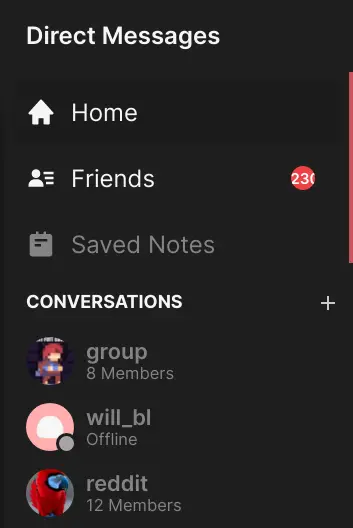
The conversations sidebar as it appears in Lavender
Server Sidebar
The server sidebar is composed of the server banner with the title on top, and a list of categories and channels below.
Categories may be collapsed, and continue to show the active channels when collapsed
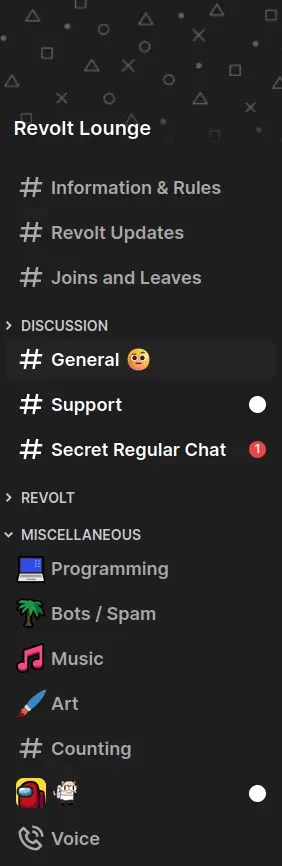
The server sidebar as it appears in Lavender
Ordered Channels Algorithm
- Initialise a set $U$ of uncategorised channel IDs from server channels the client may access.
- Initialise an empty list of categories $C$
- If server.categories are defined, for each category:
- Remove all the channels defined in the category from set $U$
- Add category to list $C$
- If the set $U$ is not empty:
- Find the “default” category if it exists in $C$
- Merge the “default” category channels if they exist with and preceding the set $U$
- Create a category with id=“default” and add it to the start of the list $C$ if it does not exist
- Return the list $C$
Text Channels
Message Grouping Algorithm
Within this algorithm, tail refers to whether the message omits displaying the user’s avatar / username.
This algorithm expects that the rendering of the output list is reversed, if you need it from oldest to newest: either reverse at the end or adapt the logic.
- Let L be the list of messages ordered from newest to oldest
- Let E be the list of elements to be rendered
- For each message M in L:
- Let tail be true
- Let date be null
- Let next be the next item in list L
- If next is not null:
- Let adate and bdate be the times the message M and the next message were created respectively
- If adate and bdate are not the same day:
- Let date be adate
- Let tail be false if one of the following conditions is satisfied:
- Message M and last do not have the same author
- The difference between bdate and adate is equal to or over 7 minutes
- The masquerades for message M and last do not match
- Message M or last is a system message
- Message M replies to one or more messages
- Else if next is null:
- Let tail be false
- Push the message to list E
(type id: 0; cache key: message id:tail) - If date is not null:
- Push date formatted as “MMMM D, YYYY” to list E
(type id: 1; cache key: formatted date)
- Push date formatted as “MMMM D, YYYY” to list E
Note: the Upryzing client also caches the objects produced for list E by pushing each object into a Map by their given cache key above, then retrieving them the next time the code is run OR creating a new object if one is not present. This prevents Solid.js from completely rebuilding the DOM whenever the message list updates.
Session Lifecycle
To ensure reliability for users on Upryzing, clients should implement the following rigid specification for maintaining a session. At a high-level, it should be implemented as a state machine.
flowchart TD
subgraph LOGGED_IN[Logged In - Display Client UI]
CONNECTED
CONNECTING
RECONNECTING
DISCONNECTED
OFFLINE
...
end

subgraph LOGGED_OUT[Logged Out - Display Auth Flow or Loading Indicator]
READY
LOGGING_IN
ONBOARDING
DISPOSE
ERROR
end

READY -->|LOGIN_UNCACHED| LOGGING_IN
READY -->|LOGIN_CACHED| CONNECTING
LOGGING_IN -->|NO_USER| ONBOARDING
LOGGING_IN -->|PERMANENT_FAILURE| ERROR
LOGGING_IN -->|TEMPORARY_FAILURE| ERROR
ONBOARDING -->|CANCEL| DISPOSE
DISPOSE -->|READY| READY
ERROR -->|DISMISS| DISPOSE

LOGGING_IN -->|SOCKET_CONNECTED| CONNECTED
RECONNECTING -->|SOCKET_CONNECTED| CONNECTED
CONNECTING -->|SOCKET_CONNECTED| CONNECTED

ONBOARDING -->|USER_CREATED| LOGGING_IN
CONNECTED -->|TEMPORARY_FAILURE| DISCONNECTED
DISCONNECTED -->|RETRY| RECONNECTING
DISCONNECTED -->|DEVICE_OFFLINE| OFFLINE
RECONNECTING -->|TEMPORARY_FAILURE| DISCONNECTED
CONNECTING -->|TEMPORARY_FAILURE| DISCONNECTED
CONNECTING -->|PERMANENT_FAILURE| ERROR
RECONNECTING -->|PERMANENT_FAILURE| ERROR
OFFLINE -->|DEVICE_ONLINE| RECONNECTING

... -->|LOGOUT| DISPOSE
Implementation Details
The table below describes how each node should behave.
- All nodes SHOULD have corresponding visual feedback.
- Nodes MAY have effects on entry.
- You SHOULD keep track of additional state such as:
- Number of connection failures
| Node | User Interface | Logic |
|---|---|---|
| READY | Show login interface | May transition out by external source. |
| LOGGING_IN | Show loading indicator | On entry, try to authenticate the user. |
| ONBOARDING | Show username selection | May transition out by external source. |
| ERROR | Show the permanent error with option to dismiss it | May transition out by external source. |
| DISPOSE | Show loading indicator | Dispose current client and create a new one. |
| CONNECTING | Show client UI with banner “Connecting” | On entry, try to connect socket. |
| CONNECTED | Show client UI | May transition out by external source. Set connection failures to $ 0 $. |
| DISCONNECTED | Show client UI with banner “Disconnected” | May transition out by external source. Increment connection failures by $ 1 $. If the device is offline, trigger transition to OFFLINE. On entry, set a timer to retry†. On exit, cancel timer. |
| RECONNECTING | Show client UI with banner “Reconnecting” | On entry, invalidate cached data (message history, members list) and try to connect socket. |
| OFFLINE | Show client UI with banner “Device offline” | May transition out by external source. |
† Please use the formula $ (2^x-1) \pm 20 % \textsf{ seconds} $ for the delay where $ x $ is failure count.
// JavaScript implementation
let retryIn =
  (Math.pow(2, connectionFailureCount) - 1) * (0.8 + Math.random() * 0.4);
let retryInMs = retryIn * 1e3;
setTimeout(() => reconnect(), retryInMs);
The following listeners need to be registered that emit the given transitions:
| Listener | Transition |
|---|---|
| Connected to Upryzing (and initial data loaded) | SOCKET_CONNECTED |
| Connection to Upryzing dropped | SOCKET_DROPPED |
| Received logout event from socket | LOGOUT |
| Connection failed | TEMPORARY_FAILURE |
| Connection failed (session invalid) | PERMANENT_FAILURE |
| Device has gone online | DEVICE_ONLINE |
Socket Details
When implementing your WebSocket connection, you should also implement the following:
- A heartbeat mechanism that sends the Ping event every 30 seconds, and disconnects if a Pong event is not received within 10 seconds.
- A connection timeout mechanism that drops the WebSocket connection if no message is received within 10 seconds of initiating the connection.
User Experience Considerations
- While not strictly relevant to session lifecycle, if you encounter BlockedByShield during login, you should provide a link to the relevant support article.
- Upon encountering a permanent error (session invalid), you should use the known user information to fetch their current flags. This way the message can be tailored to display if: they have been logged out, they disabled their account, their account has been suspended, or their account has been banned.
- When a logout event is received externally, show some sort of indicator that they have been logged out beyond just kicking them to the login screen.
If the connection failure count reaches $ 3 $ or more, query the health service for any outage information.This point is WIP, need considerations about increasing polling rate while connection failures are high, etc.
Using Lingui
Import the macro package wherever you wish to use Lingui, prefer to use the JSX syntax:
import { Trans } from "@lingui-solid/solid/macro";

<Trans>Hi, I am a string!</Trans>

<Trans>There are {5} users in queue.</Trans>
But if necessary, you can use the hook where strings are needed:
import { useLingui } from "@lingui-solid/solid/macro";

const { t } = useLingui();

t`Hello, chat!`;

t`There are {3} people in your walls.`;
If your use case doesn’t fit here, ask a maintainer for guidance.
Plurals
Use the Plural component:
import { Plural } from "@lingui-solid/solid/macro";

<Plural
  value={5}
  one="# Member"
  other="# Members"
/>
Learn more in the Lingui documentation.
Updating catalogs
To update the catalogs, one must run:
pnpm --filter lavender lingui:extract && \
pnpm --filter lavender lingui:compile
NB. don’t run this yourself!
A maintainer will do this regularly & after merge down to main!
Using Dayjs
To use localised dayjs functions (or use any imported plugin), use the time hook:
import { useTime } from "@revolt/i18n";

function Component() {
  const dayjs = useTime();

  return <span>Time at initial render: {dayjs().format("LT")}</span>
}
Translating Errors
To handle an API error, use the hook:
import { useError } from "@revolt/i18n";

const err = useError();

<span>{err(someErrorObject)}</span>;
General Guidelines
This needs expanding on, but some key points!
types.tscontains all the type information for modalsmodals.tsxcontains all the component mounting codemodals/*.tsxare all the individual modals- All modals should use the
Dialogcomponent except in special circumstance - If you take user input, use Form2 (ex. EditUsername)
- If you are performing an action, use Tanstack Mutations (ex. ChannelToggleMature)
NB. take care to usemutateAsyncinstead ofmutateto keep dialog open while pending
NB. bindonErrortoshowErrorfromuseModals() - Do not mix Tanstack and Form2, you’re either using one or the other
They both provide the necessary UX flows, e.g. ‘pending’ actions
Your action onClick handlers can return one of the following:
- A
Promise<any>which on resolution will close the dialog, otherwise will do nothing. - A non-
falsevalue which will close the dialog. - The value
falsewhich will prevent the dialog from closing.
Reference Guide
WIP: currently undergoing some work on this…
Colour
The following Material colour roles are accessible through the CSS variables var(--md-sys-color-*):
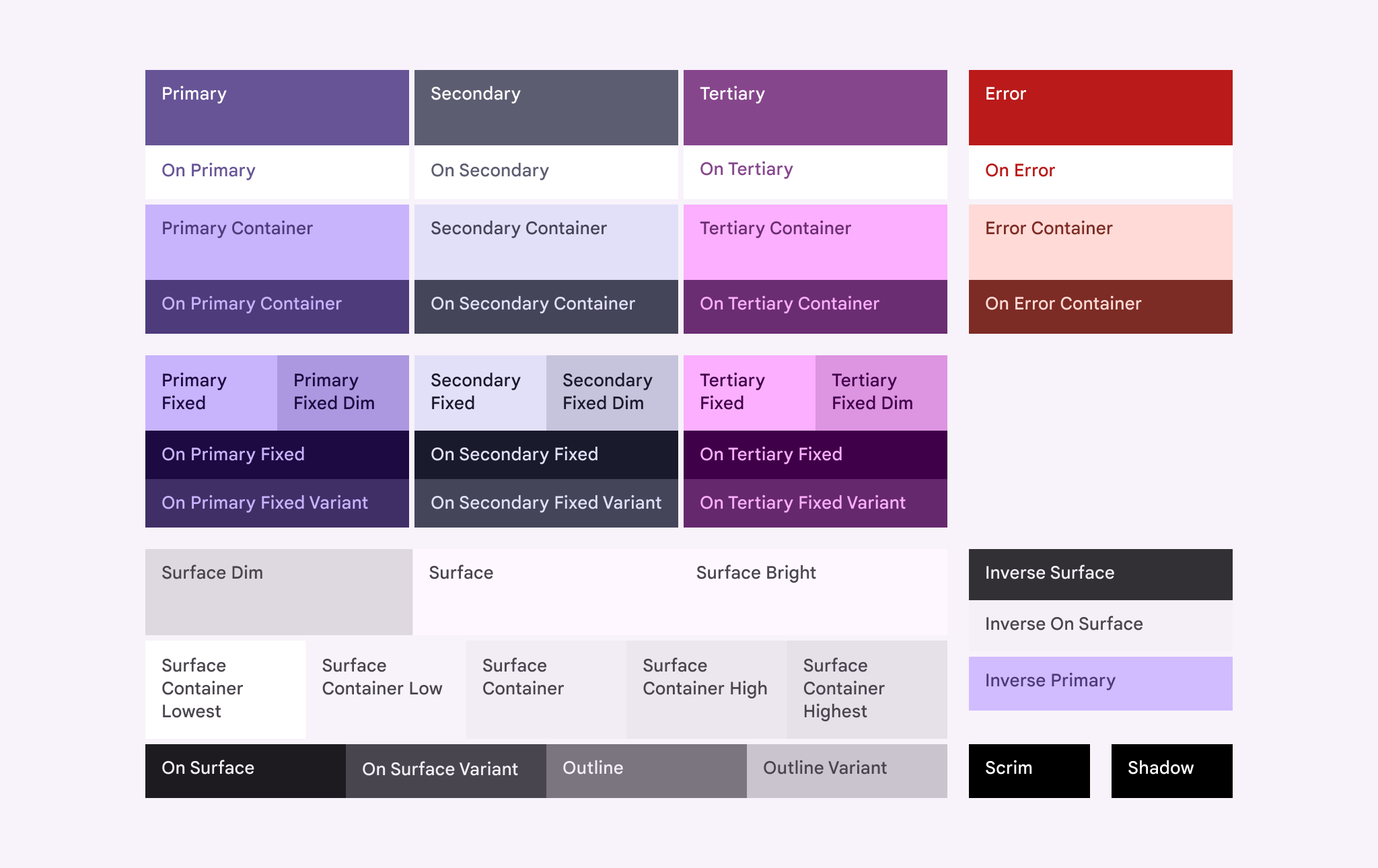
TODO: extension with online,idle,focus,busy,invisible
Roundness
Border radius values are provided as var(--borderRadius-none|xs|sm|md|lg|li|xl|xli|xxl|full|circle), these correspond to the corner radius scale in Material 3 expressive design.
Learn more here about how to apply the scale: https://m3.material.io/styles/shape/corner-radius-scale
Gaps
Gap values are provided as var(--gap-none|xxs|xs|s|sm|md|lg|x|xl|xxl)
Fonts
Font values are provided by:
- Primary:
var(--fonts-primary) - Monospace:
var(--fonts-monospace)
Typography
Typography tokens are currently fixed.
Transitions
Two transition speeds are specified (in format, <time> <easing>):
- Fast:
var(--transitions-fast) - Medium:
var(--transitions-medium)
Using Form2
Form2 is the primary and recommended way to handle any complex user input to request pipeline.
It is intended to supersede <Form /> with the design goals of making form declarations a bit more involved to avoid complex implicit behaviours from forming, essentially following KISS philosophy.
@todo add information about how to display general errors!
In general, usage looks as follows:
// create your group using solid-forms
const group = createFormGroup({ .. });

// define your handler
// NB. can be a Promise<..>
async function yourSubmitHandler() {
  // do something with group.controls.<control>.value, ..

  if (somethingWrong) {
    throw "error";
    // inserted into errors as 'error'
  }
}

// define a handler to reset the form (if you need this functionality)
function onReset() {
  // group.controls.<control>.setValue(/* whatever it should be / now is */)
}

const submit = Form2.useSubmitHandler(editGroup, onSubmit, onReset);
Then create the form itself in the JSX code:
<form onSubmit={submit}>
  // use a wrapper for TextField that implements control:
  <Form2.TextField
    name="name"
    control={group.controls.name}
    label={t("i18n.key")}
  />
  // include an image picker:
  <Form2.FileInput control={group.controls.icon} accept="image/*" />
  // use the provided buttons for best integration:
  <Row>
    // if appropriate, allow the user to reset the form back to original state
    <Form2.Reset group={editGroup} onReset={onReset} />
    // in-built submission button:
    <Form2.Submit group={editGroup}>
      <Trans>Save</Trans>
    </Form2.Submit>
    // you should also indicate when submission is pending:
    <Show when={editGroup.isPending}>
      <CircularProgress />
    </Show>
  </Row>
</form>
There are examples provided throughout the code, just search for <Form2 in the codebase.
@todo explain this but…
when using with Modals, use !Form2.canSubmit for action